
More Information and Examples of Using Personal Info Keeper
Personal Info Keeper is a versatile application for securely storing, organizing, and managing personal information. It allows you to save passwords, text, contact details, links, and other useful data in a structured system of folders and items, then quickly transfer information to HTML forms and Windows applications using drag-and-drop, OLE, or the Windows Clipboard.
Key Features:
- Data Security & Encryption - secure storage of personal information with AES encryption and configurable security levels for private files.
- Personal Information Management - organize information in a structured tree of folders and items, including text, passwords, links, and rich text.
- Password Management - store passwords securely, generate new passwords, and keep password records.
- Search - quickly find text across items and folders.
- Backup & Recovery - back up data without closing the application and recover deleted items and folders using the Recycle Bin.
- Reminders - create reminders for birthdays, anniversaries, appointments, and other events.
- Favorites & Link History - quickly access frequently used folders, items, and links.
- Link Management - open files and URLs directly from the application, with support for system icons.
- Data Import & Export - import existing data and export all or part of a private file to
.pikor.csvformat. - Portable Version - run Personal Info Keeper from a removable device such as a USB drive.
- Flexible Data Management - work with multiple data files and easily copy, move, and reorganize folders and items.
- Interface Customization - customize fonts, font styles, and font sizes throughout the application.
- Additional Convenience & Security Options - configure startup behavior, status-bar display, automatic minimization after inactivity, and other application settings.
Examples of Use Include:
Password Management Facility
Personal Info Keeper is the ideal tool for managing your passwords. With Personal Info Keeper, you can set a password and forget it. Whenever you want to use the password, simply drag it from Personal Info Keeper, to the application prompt.
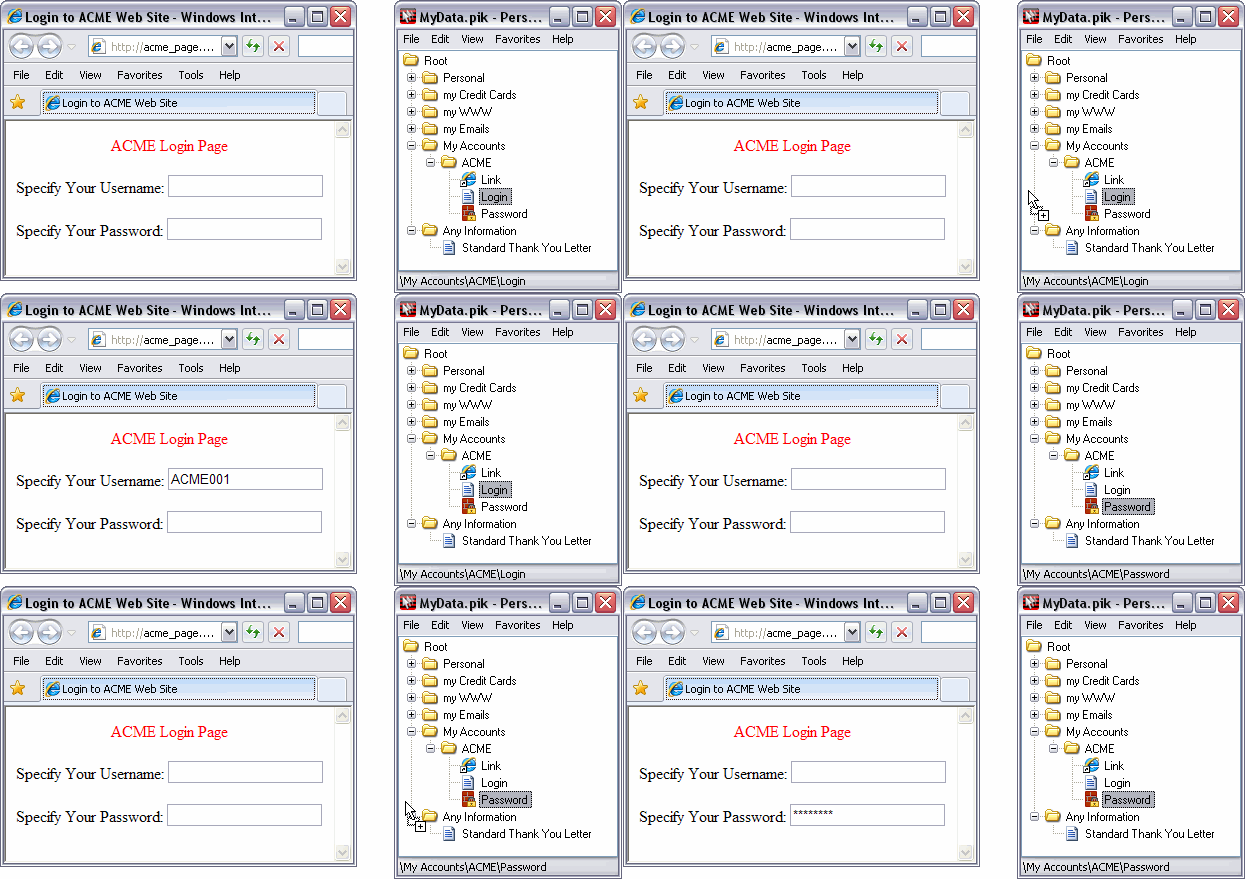
Password features include:
-
Personal Info Keeper access password.
Personal Info Keeper may be set to require a password, whenever it is started. Using the "access password" means that your passwords are secure and may not be used without your knowledge and permission. The access password also becomes the key that is used to encrypt the data stored in Personal Info Keeper.
-
Automatic generation of strong passwords, including password format specification.
Personal Info Keeper can generate strong passwords, according to a predefined pattern specified by the user. This facility allows the user to quickly generate new passwords, random passwords.
-
Previous passwords are automatically saved.
Personal Info Keeper can be set to automatically save previous passwords. Any number of previous passwords may be saved and accessed by the user.
-
Encryption of saved passwords.
Personal Info Keeper encrypts its saved data, so even if someone were to copy your files, your passwords would not be in plain text and would not be available to malicious persons.
Moving Multi-Line Text
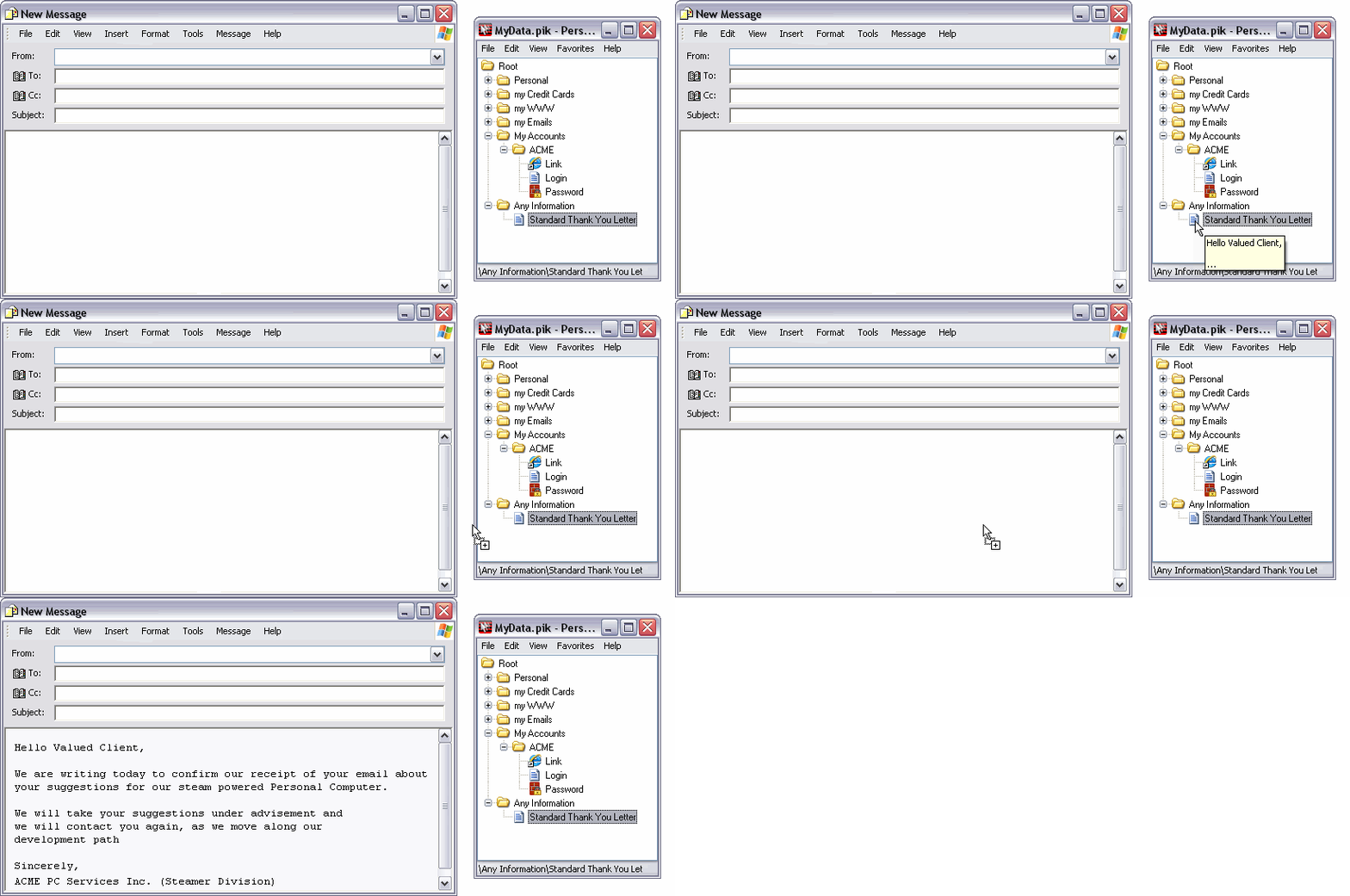
In this example, a complete letter has been captured and saved into Personal Info Keeper. The letter is a standard reply format that is used repetitively within the organization. Instead of having to copy and paste the text from a "saved email", the text is simply dragged from Personal Info Keeper.
Bookmarks to Files and URLs
You may also define saved text as a "link". Use of this attribute will tell Personal Info Keeper to start an associated application. For example, if you save the text "//www.personalinfokeeper.com" as a link within Personal Info Keeper, then when you access this link, your browser will automatically be started. This will be true of any other url or file, where the file name suffix is associated with a Windows program.
This feature saves you more time and effort when you repeatedly access the same file or url.
Requirements
To use Personal Info Keeper, you need Microsoft Windows 98 or above.
Go back to Personal Info Keeper main page.